
Coding Arduino C++ with Brian
Welcome to Brian's computer science and coding page for Arduino C++ and the Arduino microcontroller.
This page currently contains the complete archive of classes and resources for the 2025 - 26 school year.
The coding class for the 2026-27 school year is available under Unit 29: Coding MicroPython.
During the upcoming school year, you’ll learn to write computer programs using Arduino C++ to control an Arduino Uno R3 microcontroller.
Through hands-on coding (called sketches), you’ll help digital computers interact with the analog world.
This class starts from the beginning and assumes no prior knowledge of electronics or coding.
You’ll build programs that read sensors (like temperature, light, and distance) and control outputs (like LEDs, motors, and relays).
In addition to coding and electronics, this class is an introduction to computer science, covering:
-
Programming fundamentals: functions, loops, conditionals, variables
-
Key concepts: binary numbers, Boolean logic, and libraries
-
Problem-solving skills: debugging techniques and common coding mistakes
There will also be frequent challenges during “off” weeks — perfect for returning students seeking a deeper experience.
By the end of this course, you'll have an excellent foundation to help you write your own programs.
[am4show have='p8;p9;p11;p38;p92;p161;' guest_error='Guest error message' user_error='User error message' ]
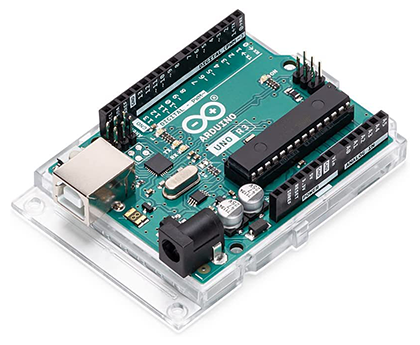
The Arduino Uno R3
In addition to the electronics parts, this course requires an Arduino Uno R3. Be sure that you order an Uno that is labeled "R3". (R3 stands for Revision 3).
You can add one to your kit order from FutureVision Research or you can purchase it separately:
Click here to order an Arduino Uno R3 from Amazon.
You will also need a USB-A to USB-B cable.
Getting Ready for Your Classes
Step 1.
Subscribe to Brian's class update email list through Substack.
Brian uses this email list to send updates throughout the year.
During the summer he provides information on kits.
During the school year, Brian sends information on class resources and upcoming projects.
Step 2.
Practice Touch Typing
Touch typing is an important part of coding.
Learn to touch type with this free service.
Note: Supercharged Science is not affiliated with TypingClub.
Step 3.
Order your supplies
This class requires:
- FutureVision Research Kit: Sensors, Motors, and More – Version 3
(or use the shopping list available on this page) - Arduino Uno R3, USB cable
- A Windows, Apple, or Linux computer
Watch this video for an explanation of the class schedule and required supplies.
Step 4.
Install the Arduino IDE* Program onto Your Computer
We'll use a program called "Arduino IDE" to upload programs to our device.
The Arduino IDE is available here: arduino.cc/en/software
*This year, we are using this "installable" version (instead of the cloud version that was used during the 2023 - 24 classes).
Step 5.
Watch the special class "Getting Organized and Preparing for Coding the Arduino with Brian."
Note regarding parts boxes (this will be addressed during the getting organized class):
As of August 2025, Harbor Freight has discontinued their Storehouse 10 Utility Box. However, Brian does have the 10 tray boxes in stock.
Therefore, if you purchase Brian's "Sensors, Motors, and More" kit for this class, you will have the option to add a 10-tray box to your order.
Boxes purchased from Brian will include “ready-to-cut” label cards to help you organize your parts. Alternatively, you can order the boxes directly from Harbor Freight and then purchase the cards from Brian, or print your own.
The links below provide printable labels for the 10-tray utility boxes. If you have the new 4 drawer boxes, please visit Unit 25 to download the proper labels.
Step 6.
Join Brian's Classes
This class occurs on Wednesday and Thursday every other week at 8:00AM (Pacific). Each session is approximately 60 minutes and includes time for Q&A, troubleshooting and interaction between Brian and the students.
Thursday classes will include up to an extra 30 minutes of discussion time.
All classes are on Zoom, and all recordings are posted to this page (below).
Each class covers different content, and the Wednesday/Thursday two-day format means that Part 1 is on Wednesday and Part 2 is on Thursday. Please make sure you attend all the sessions if you wish to make all of the projects.
Coding Arduino C++ with Brian classes were on Wednesdays and Thursdays at 8:00AM during the 2025 and 2026 school year.
Class discussions were Thursdays at 9:00AM (Pacific) and not recorded.
2025 - 2026 Resources and Videos
Sketches for this class are available here: github.com/FutureVision-Research/coding_arduino
Book Recommendations from Brian
Magazine Recommendations from Brian
Programming Arduino: Getting Started with Sketches, Third Edition
by Simon Monk
This fully updated guide shows, step by step, how to quickly and easily program all Arduino models using its modified C language and the Arduino IDE.
Programming Arduino Next Steps: Going Further with Sketches, Second Edition
by Simon Monk
Take your Arduino programming skills to the next level using the hands-on information contained in this thoroughly revised, easy to follow TAB guide.
Raspberry Pi Magazine (AKA MagPi)
Monthly magazine that offers tutorials, project ideas, news, and reviews focused on Raspberry Pi computers and electronics.
All issues are available as free downloads.
Hackspace Magazine
Originally produced by the Raspberry Pi Foundation, Hackspace magazine provides tutorials on electronics and various microcontrollers.
Hackspace was merged into Raspberry Pi Magazine in 2024. However, 81 issues were produced and are still available for free.
Elektor Media and Learning
This organization publishes a magazine called Elektor. They also offer many online learning resources and videos on electronics. However, most of it requires a paid subscription.